Photorealisticimages, fromyour own GPU.

Daguerra turns a RunPod pod into a complete image studio. Launch the template, paste your license key and start creating.

Illustrative frames. Your own prompts produce your own images.

Illustration: a misty mountain lake at first light
Illustration: two stone arches in a sunlit plaster wall
Illustration: three ceramic vessels on a table in soft window light

From template to first image

  1. Launch the template

    Deploy on RunPod with a 24 GB GPU or more, and attach an 80 GB volume.

  2. Paste your key

    Daguerra checks the license on the pod, offline. Add your Civitai token once.

  3. Let it fetch

    Missing nodes and models download on first boot and are verified by hash.

  4. Generate

    Daguerra unlocks as soon as the pipeline is ready. Open port 3000.

Try the studio

Pick a scene and press Generate to see how a frame develops. This is a preview of the interface with illustrative frames, not a live generation.

Prompt
Misty mountain lake at first light, low sun behind layered ridges, still water, soft haze, shot on a full-frame camera
Scene
Illustrative frame for the scene: Lake at dawn

Write your own prompts on your own GPU.

One quiet screen, everything within reach

Watch every frame develop

Live previews show the composition settling, so you can stop a weak run early and keep your GPU time for the good ones.

  • Download, copy, or send the same settings back to the prompt
  • Switch between the final image and the raw first pass

Write less, get a richer prompt

Drop a reference image and Daguerra writes a detailed prompt from it, or press Enhance to turn a short idea into a full description of framing, camera, light and setting. Read it, edit it, undo it.

Your own styles and subjects

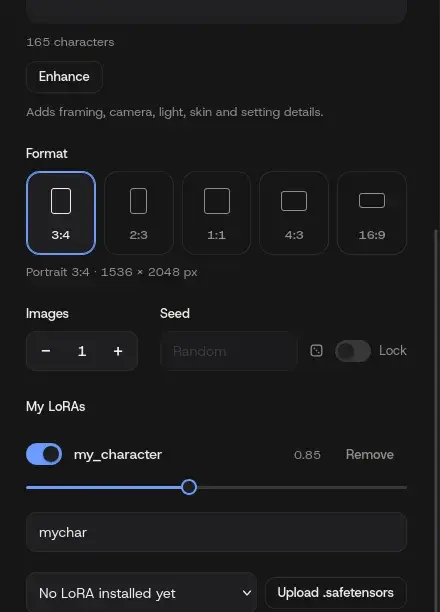
Upload a LoRA or pick one already on your volume. Set its strength and trigger word once, and keep the same look across a whole series of images.

  • Up to six LoRAs at a time
  • Switch each one on or off without removing it
The My LoRAs section with a LoRA switch, strength slider and trigger word field

Finish like a real camera

One button under a finished image gives it the look of a phone, a compact or a DSLR. Slide across the picture to compare before and after, and download either version.

Illustration before the camera look

Everything you made, one click away

Every result lands in a history strip under the viewer. Move between images with the arrow keys, download, copy the prompt or reuse the settings.

Works from your phone, and stays current

The interface adapts to small screens, with ComfyUI and JupyterLab one tap away. A News page in the app lists what changed in every release.

What you need

  • 24GBGPU memoryAn RTX 4090 runs without errors. An RTX 5090 with 32 GB is smoother.
  • 48GBSystem RAMUsed for offloading.
  • 80GBVolumeAbout 50 GB of model weights, downloaded once and kept.
  • A RunPod account.The pod runs on your account and RunPod bills the GPU time directly.
  • A Civitai token.Free, and needed once to download the main model.

The template requires CUDA 12.8 or newer. First boot takes roughly 10 to 30 minutes while models download.

Reviews

Written by people who use Daguerra. Every review is read before it is published.

Share your experience

Rating

Questions

Do I pay for GPU time through you?

No. The pod runs in your own RunPod account, so RunPod bills you directly. A license covers the Daguerra software.

How does the license key work?

You receive a key by email after purchase and paste it into Daguerra, or set it as LICENSE_KEY on the template. It is verified on the pod, with no license server.

Where do the models come from?

From their original sources, Civitai and Hugging Face, with your own tokens. Each model keeps its own licence, which you accept with your own account.

Can I still use ComfyUI directly?

Yes. ComfyUI and JupyterLab run on the same pod and are linked from the Daguerra header.

What happens to my images?

They are generated and stored on your pod, in your volume. Daguerra does not upload them anywhere.

What if my GPU is out of stock?

The template does not depend on a datacenter. Pick another GPU or region on RunPod and attach a volume in that region.

Start generating in minutes

Get a license key and deploy the template on your RunPod account.